The path to improving AI agents and applications can be simplified into two primary functions: identifying what needs improvement and experimenting with changes that fix the issues you find.
AI engineering teams quickly realize that one of the best ways to identify what needs improvement is by reviewing and annotating lots of real-world data. It’s often the only way to develop a nuanced sense of what’s working, what’s not, and how a system should change.
But what happens when you’ve got a whole team of people annotating data? And even more LLM judges scoring production logs and leaving notes in the form of reasoning traces? The next challenge becomes how to make sense of all those annotations and decide where to focus.
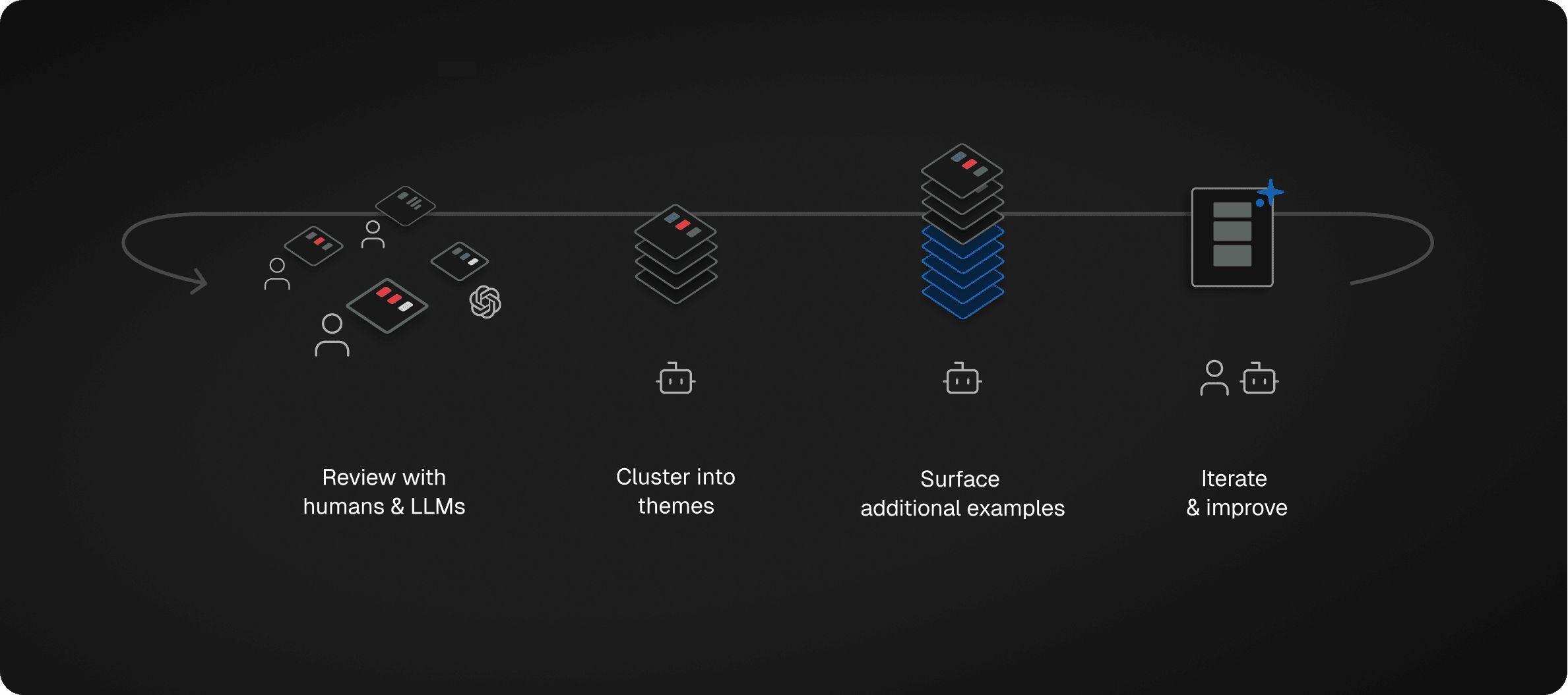
That’s the problem Freeplay’s new Review Insights feature is built to solve. Every time your team reviews a trace or completion and leaves a note or label, our agent goes to work for you in the background.
The agent looks across related human annotations, LLM judge scores and reasoning traces, and then searches for patterns among them. It then clusters annotations together into relevant themes with actionable steps you can immediately take to address the theme. As it finds new themes, it searches for other relevant examples you haven’t reviewed yet to build a clearer picture of the issue. All themes are connected to individual traces or completions, and you can easily click to view row-level data along with the annotations and labels left by your team.
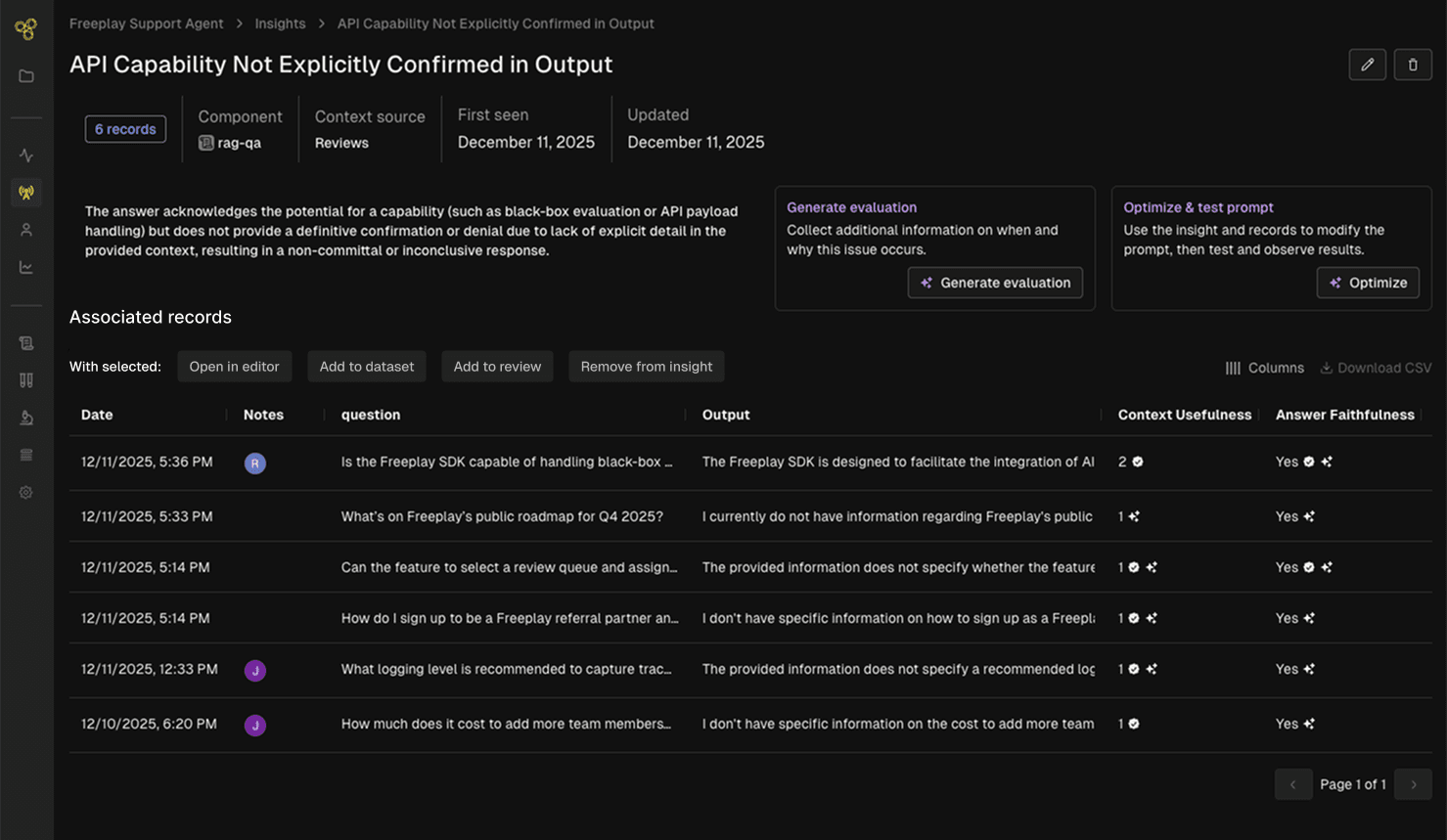
These insights on their own can be helpful. From one of our customers at a large financial institution who oversees a team of 25 people reviewing and labeling data in Freeplay:
“Seeing this and using it is a game changer. It speeds up RCA (root cause analysis) from end to end.”
Then once you learn something new, there are a range of actions you might want to take. We’ve built Freeplay from the beginning to make it really easy to connect data from one step to the next for the sake of faster iteration, and that continues here.
For each insight, we’ve made it seamless to take action:
Create a new eval metric: Does the theme look like something you’d want to detect and measure in the future? Our AI-assisted eval creation tools will help you quickly create and test an LLM judge to monitor for the issue in production.
Add results to a dataset: Want to make sure you fix this issue in the future? Save all the relevant examples to a dataset that you can run through a future test or evaluation to confirm the problem is resolved.
Launch a prompt optimization experiment: For cases where the theme applies to prompt-level data (aka “completions” in Freeplay), you can click to launch an AI-powered prompt optimization experiment that narrowly focuses on improving the prompt relative to the theme.
Open relevant examples in the playground: Want to try to improve a prompt yourself? You can also open relevant records straight into the Freeplay prompt editor and experiment with your own improvements.
Each of these actions turns an insight into a faster iteration cycle, contributing to a richer data flywheel that powers continuous improvement of your agent or product. Soon you’ll have better, more representative datasets to test with, better evaluation metrics to catch the issues that really matter, and a faster path to improve prompts and ship experiments.
Check out a quick demo here to see it in action.
We believe the future of AI engineering is going to involve a lot more help from AI to assist at each step in the iteration process, and this is one more example of how Freeplay’s AI agents can help. Lots more to come! We’ll share more soon.
For now, this is live in Freeplay and you can start testing it out today. Log some data, save it to a Review Queue, and start leaving notes or labels. The agent will take it from there.
First Published
Dec 18, 2025
Authors

Jeremy Silva
Categories
Product


