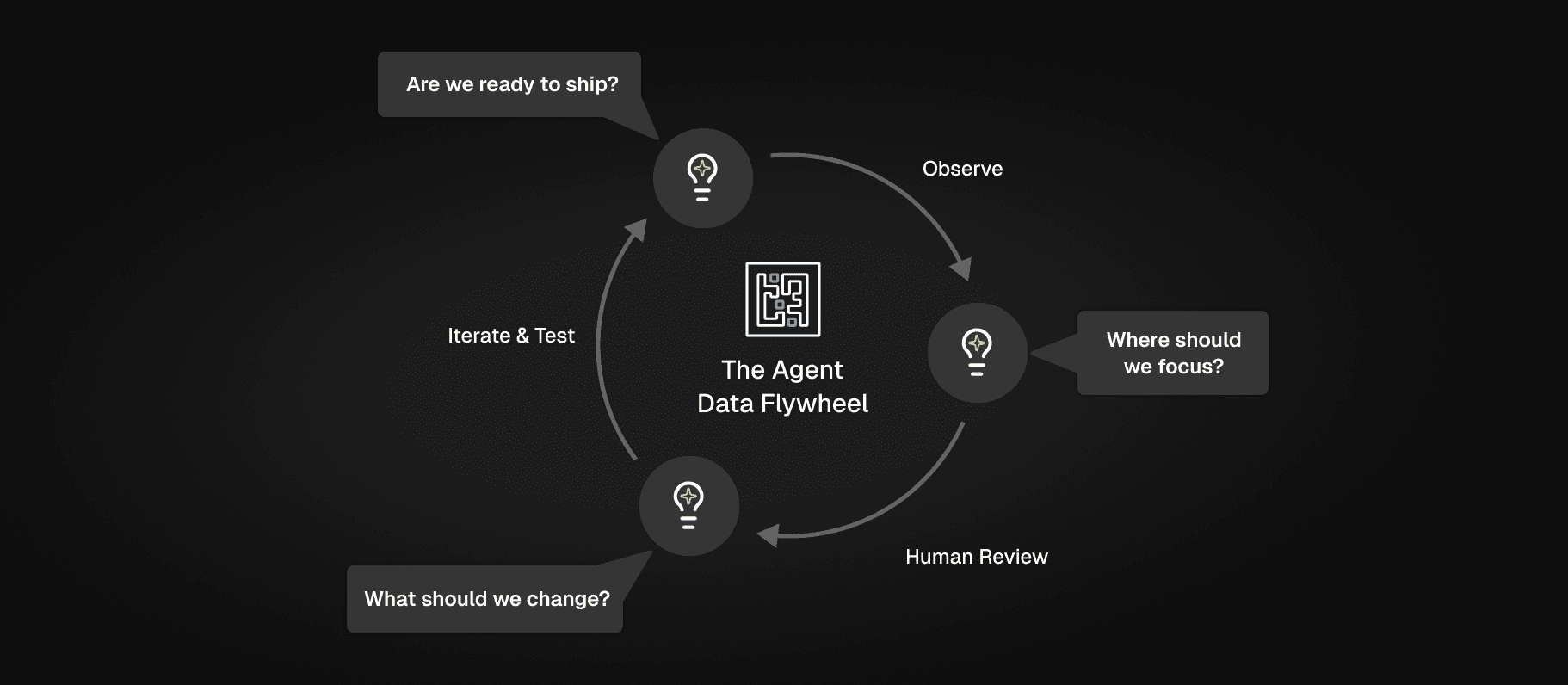
Everyone wants to build good evals for their AI projects, but even evals are just a piece of the puzzle. The real opportunity is building data flywheels to continuously improve your agents.
The idea is elegant: production data flows back into your development process, your prompts and agents get better, you ship improvements that you know are better because of your evals, and the cycle repeats. In theory, your AI product improves continuously just by running.
In practice, most teams drown in data instead.
You can quickly log hundreds of thousands or millions of traces. You can run LLM judges or other metrics to score those logs, and visualize those in dashboards showing pass/fail rates. Those might tell you that you have a problem, but scores rarely tell you how to fix anything. When you try to decide what to do to actually improve your agent, you’re stuck asking the same questions: Why is that metric failing? What should I do to fix it? Where should I start first?
Freeplay’s Insights features are built to help with exactly this problem, and at multiple points in the data flywheel. Today we’re announcing an expanded Insights product that builds on the recently-released Review Insights to help with root cause analysis and recommendations for production logs, and soon, test results.
And to help take action on these insights even faster, they’re available as a tool in the Freeplay MCP server and Claude plugin.
Check out a quick demo here, and read on for more detail.
Insights: The Intelligence Layer
Insights come from Freeplay’s own agent — our AI-powered analysis layer that sits at each transition point in your agent development workflow, helping you move from raw data to decisions.
The goal is simple: every time you start spending time in Freeplay, you should quickly be able to spot the next most impactful thing you can do to improve your agent. Then after every labeling session or experiment you run, you should quickly know what to do next.
Insights runs in three places across the Freeplay platform:
On production logs to help you answer: Where should I focus? What’s broken that I didn’t know about?
On human reviews to help you answer: What patterns are emerging across my team’s annotations? What are the root causes of issues people have seen?
On test runs to help you answer: Did things get better or worse with this latest version, and how? What’s still broken after my latest changes?
Each of these represents a decision point in the AI quality workflow: a moment where you need to interpret lots of data and decide what to do next. That’s exactly the kind of work AI is good at, and it’s where Freeplay Insights add the most value.
An Example: Insights on Production Logs
Here’s a common situation: you have 1,000,000 traces from the past week. Your LLM judges ran on a sample of them, and you have a few thousand that scored poorly. You open a dashboard and see that your “missing recommended action” eval score is showing the worst behavior, only passing 83% of the time.
Now what?
Within that set of low scores, the issues are probably not all the same. Some failures might be retrieval problems. Some might be the result of edge cases or unexpected customer queries. Some might be cases where your agent is actually doing fine but the eval is too strict. The 83% tells you there’s a problem 17% of the time. It doesn’t tell you what the problem is, or where to focus first.
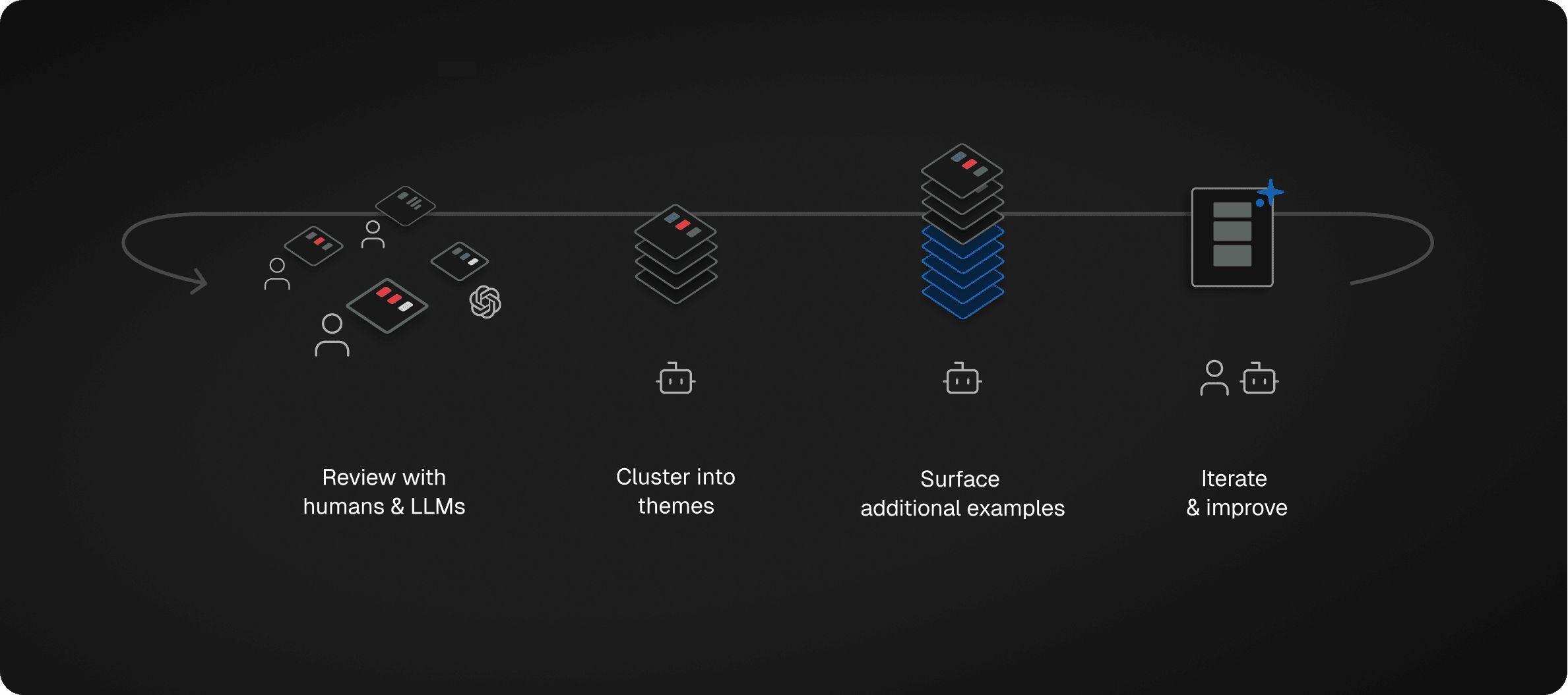
The process from there looks like reviewing the underlying trace data to better understand specific failure states from real examples, analyzing the reasoning traces from your LLM judges, then clustering similar issues together (aka “axial coding”).
Freeplay Insights accelerates exactly this workflow for production logs.
Every Monday morning, Freeplay proactively sends you insights about the past week’s production data, using scores from auto-evaluators you configure and the reasoning traces from any LLM judges. You can start your week knowing where to focus, not staring at a wall of logs wondering where to begin.
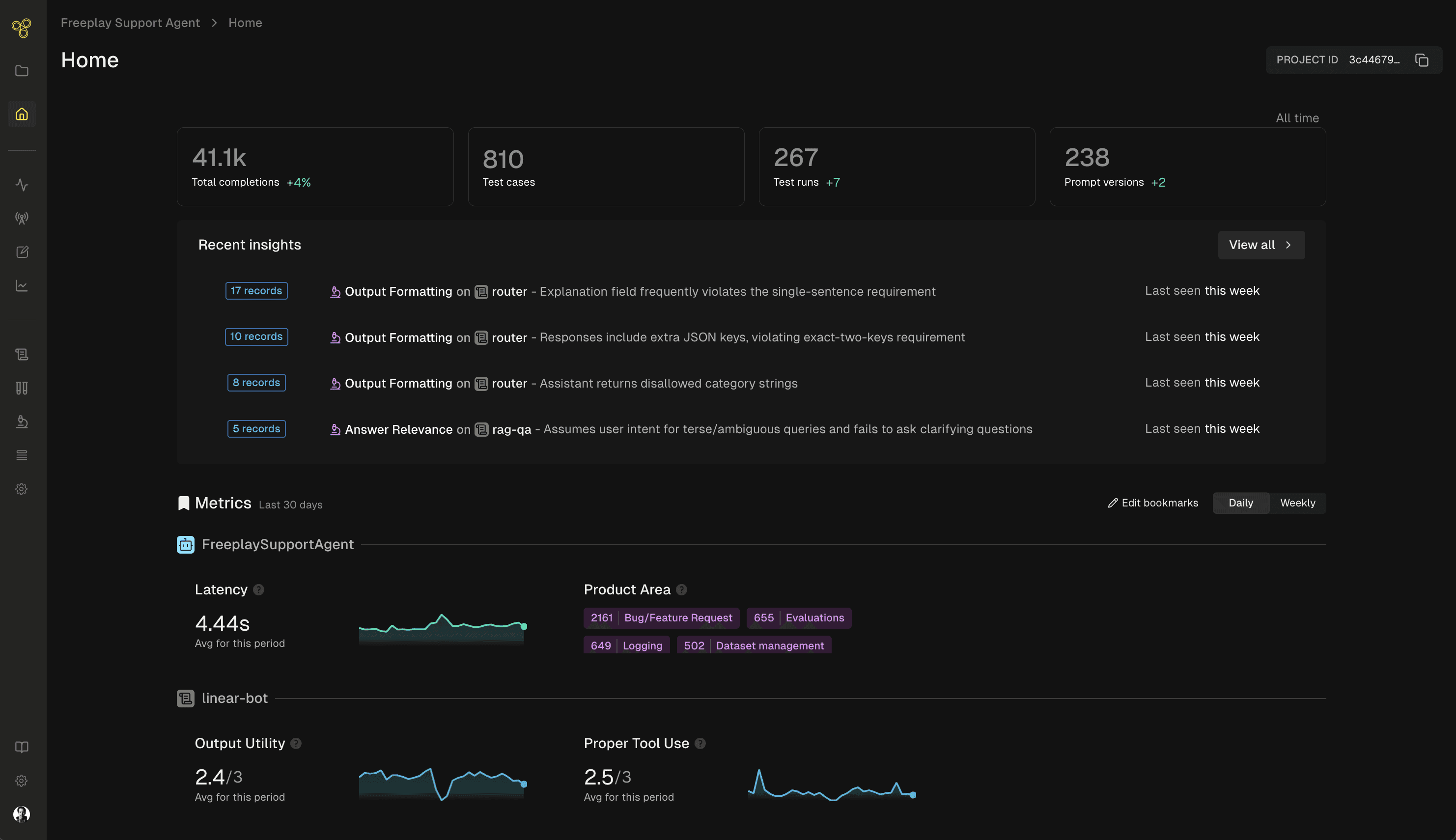
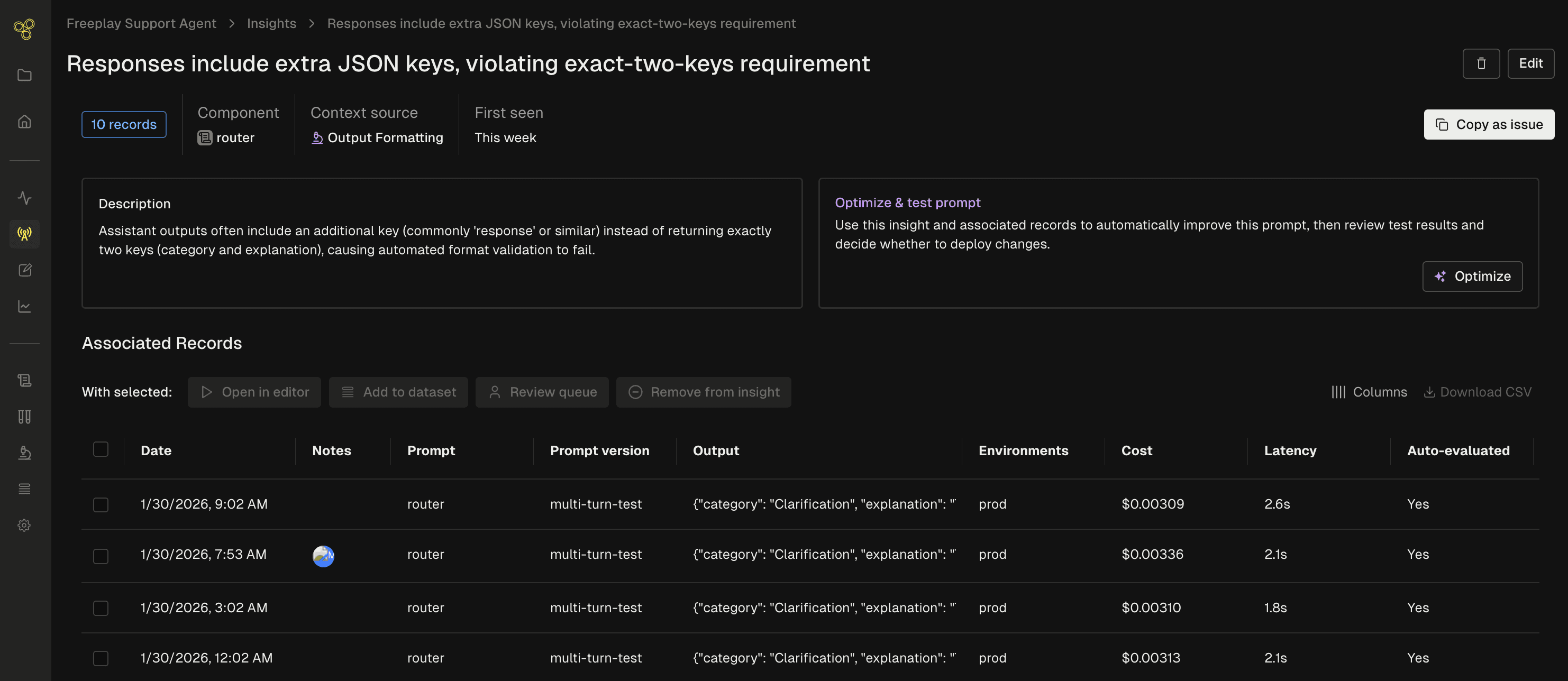
For each insight, you get a clear description of the problem and an easy link to the underlying traces that back it up. Then you can take immediate action as part of Freeplay’s connected workflows:
Escalate to human review to go deeper and understand the nuances
Add to a dataset so you can replay the same inputs and test in future experiments
Open the examples in the Freeplay playground to explore quick prompt corrections with real data
Feed the examples to Freeplay’s prompt optimization for fully automated improvement suggestions
Send to an external issue management like Linear or Jira to track and resolve
We also show you the number of matching records that go along with a given insight, which can be a proxy for scale and impact to help you prioritize what matters most.
Coming Soon: Insights on Test Runs
When you’re iterating on an agent (updating prompts and tools, running benchmarks and regression tests, etc.), you eventually hit another wall. You’ve fixed the obvious issues, your scores have plateaued, and maybe you’re not sure what to try next.
We’ve also built Insights for test runs to help here. Currently in private testing with design partners, this feature analyzes every test case in a batch test run, compares to ground truth and to multiple other versions when relevant, identifies patterns across failures, and recommends where to focus next.
A real example from our own work: We’ve built a custom coding agent for demo purposes and have been using Freeplay to hillclimb the TerminalBench coding benchmark. After a few rounds of iteration, we hit a point where scores stopped improving and we were running out of obvious fixes.
The Freeplay Insights feature analyzed the results and surfaced a pattern we hadn’t noticed: our agent kept trying to use tools that weren’t actually available yet in its environment. It was losing time attempting commands, failing, and having to recover over and over again. The Insight agent suggested adding a capability for the agent to check its environment before attempting operations. We’ll publish more about this experiment next week.
That’s a concrete, actionable suggestion we could immediately go implement and test. And it came from pattern analysis across dozens of test cases that would have taken hours to review manually.
We’re excited to bring this to the product for everyone soon.
Humans And AI Working Together
One thing worth noting: you can skip straight from log analysis to experiments, without spending lots of time on careful human review. If you see an insight and want to immediately run a prompt optimization, nothing stops you.
But we still think human review is the recommended path for most teams. Human expertise is how you create product differentiation most of the time. The best AI products are shaped by human taste and domain knowledge — exactly the kind of nuanced judgment that’s hard to automate.
In our view, automated insights shouldn’t replace human judgment. They’re useful to help it scale. Insights surface the most significant patterns so your team can focus their attention on the decisions that actually matter.
Building A Data Flywheel For Your Agent
Data flywheels have always been the dream for AI products. What’s been missing is the connective tissue: the intelligence layer that turns raw data into direction at each step.
Combined with Review Insights, automated prompt optimization, and Automations, Freeplay is fast becoming the platform where your data flywheel can actually come to life, and spin much faster. Our goal is that every log, every human review, and every experiment or test contributes to making your agent better.
Insights on production logs is live now. Check the Insights tab in your project to see what Freeplay found in your data this week. Docs are here.
Interested to test it out? Set up a Freeplay account, start logging, and configure a few LLM judges to run on your logs. You can sign up for a free account here or reach out to our Sales team for enterprise access.
First Published
Feb 12, 2026
Authors

Jeremy Silva
Categories
Product